What is MCP?
MCP is the thing that lets an AI do stuff outside the chat window. Without it, an AI can only talk. With it, an AI can reach into your email, your files, your calendar, your database, your anything, and actually use them. Let's take this apart carefully, because understanding MCP is the difference between "AI is a cool chatbot" and "AI is running half my work for me."
Start with a problem you've felt.
You've probably had this thought: "It would be so useful if this AI could just check my email and tell me what's urgent." Or your calendar. Or your Notion. Or your CRM. But when you ask, it can't. You have to copy-paste things in. You become the middleman between the AI and your stuff.
That was the whole state of AI until late 2024. The model was a brain in a jar. Very smart. Very well-read. But it had no hands. It could not reach out and touch anything in the real world. If you wanted it to use a tool, someone had to write custom code to connect that one specific tool to that one specific AI app. And if you wanted to use the same tool with a different AI? Someone had to write it again. Different code, same job. It was a massive amount of wasted effort, and it meant that most AI apps were stuck in the chat window forever.
MCP fixes this. That's the whole story. Everything else in this page is details.
The mental model: MCP is a universal plug.
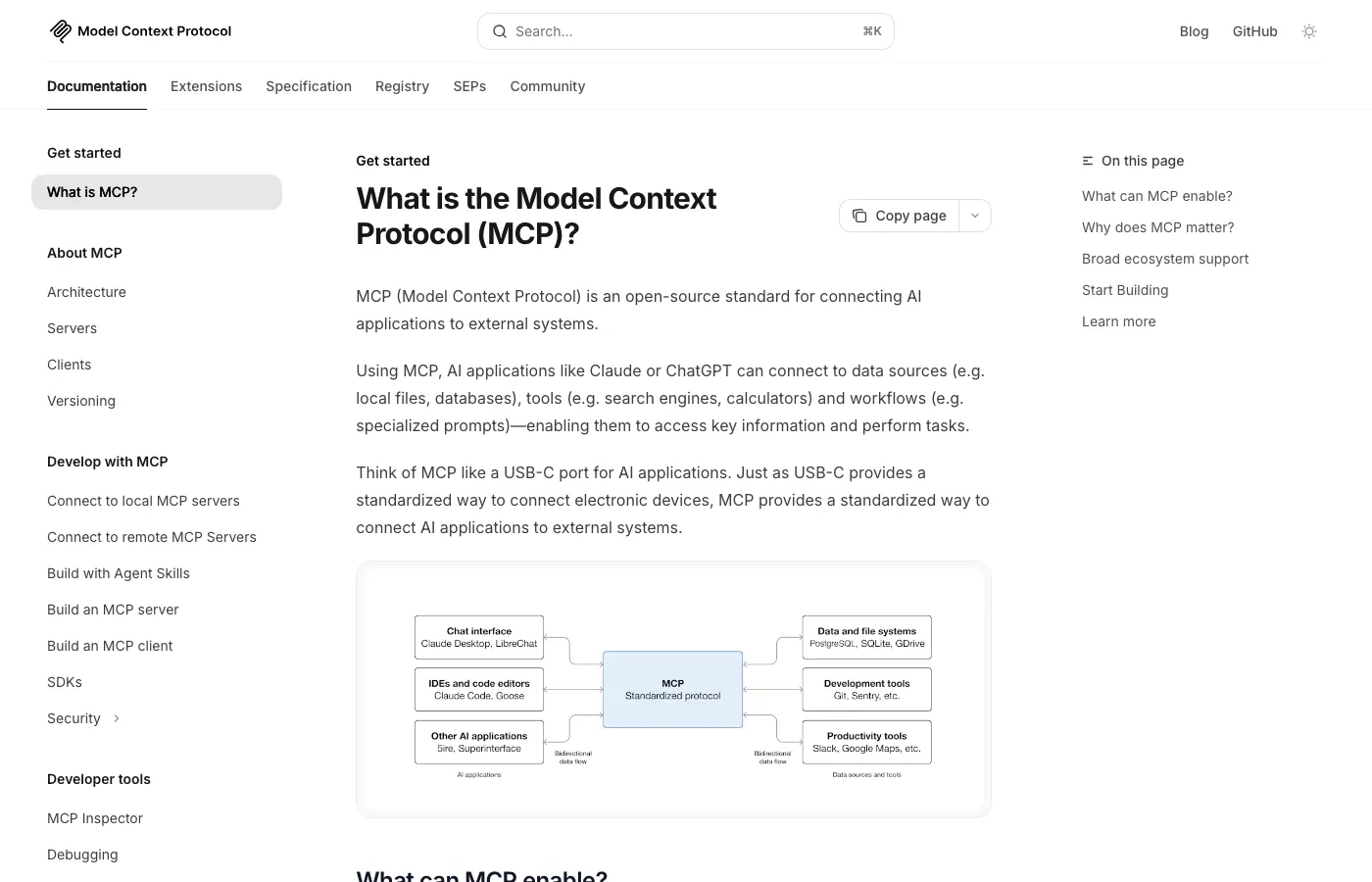
The most common analogy for MCP is the USB-C port, and it's actually a good one. Stay with it for a minute.
Think about how USB-C changed your life. Before USB-C, every device had its own plug. Your iPhone used Lightning. Your Android used Micro-USB. Your laptop used some barrel connector. Your headphones had a 3.5mm jack. Your external hard drive used USB-A or Thunderbolt. Every new device meant a new cable, a new charger, a new adapter sitting in a drawer somewhere.
Then USB-C became standard. Suddenly, the same cable charged your phone, your laptop, your headphones, your tablet. Same port on the wall outlet. Same cable in your bag. New gadget comes out? It has USB-C. Works with everything you already own.
MCP does the exact same thing for AI tools. Before MCP, every AI and every tool had to build a custom connection. After MCP, there's one plug. The AI speaks MCP. The tool speaks MCP. They understand each other, no matter who made them. Write a tool once, and every MCP-aware AI can use it forever.
That is the entire point of MCP, expressed as plainly as possible. Everything from here on is making that point precise.
Let's be concrete. What does MCP actually do?
MCP stands for "Model Context Protocol." That name is unfortunately not very helpful, so let me translate each word:
- Model means the AI. Claude, GPT, Gemini, whatever.
- Context means the outside information and abilities the AI needs to do its job. Your files. Your tools. Your data.
- Protocol is just a fancy word for "a shared set of rules for how two things talk to each other."
So MCP is a shared set of rules for how AI models get access to outside stuff. The rules say: "If you want to expose a tool to an AI, here's how you describe it. If you want your AI to call a tool, here's how you ask. Here's how the tool sends back a result. Here's how errors work." Because everyone follows the same rules, everything plugs into everything.
Two sides of the connection: servers and clients.
There are only two roles in MCP, and once you understand them, the whole thing clicks.
An MCP server is the side that has stuff. It's a little program that sits on a computer and says "I can do X, Y, and Z." If you want to let an AI use Gmail, there's an MCP server for Gmail. It runs somewhere (your computer, Google's cloud, wherever) and announces to the world: "I can search emails. I can send emails. I can label threads." That's an MCP server.
An MCP client is the side that uses stuff. This is the AI app you're actually talking to. Claude Code is an MCP client. Claude.ai is an MCP client. Cursor is an MCP client. Any AI app that can connect to MCP servers and make their abilities available to its model is a client.
The client says to the server: "Hi, what can you do?" The server responds with a list. The client shows that list to the model. Now when the model wants to use one of those abilities, it speaks the MCP protocol to the server, the server does the work, and the result comes back. That's the whole dance.
A worked example. Walk it through end to end.
Imagine you're using Claude Code (an MCP client) and you've installed the Gmail MCP server (using a one-line command you got from a directory of MCPs).
You type: "What are the three most urgent emails in my inbox right now, and draft a reply to each?"
Here's what actually happens under the hood:
- Claude Code (the client) asks the Gmail MCP server at startup: "What can you do?" The server answers: "I have tools called
search_emails,get_email,draft_reply." - Claude Code hands that list to the Claude model. The model now knows these tools exist and how to use them.
- The model reads your request. It thinks: "To find the most urgent emails, I need to search the inbox." It calls
search_emailswith something like:{"query": "in:inbox", "limit": 50}. - Claude Code sends that call through MCP to the Gmail server. The server talks to Gmail's API, gets the emails, and sends a result back. Let's say it returns a list of 50 email summaries.
- The model reads the summaries, figures out which three look urgent (maybe based on sender, keywords, how old they are), and calls
get_emailthree times to read each one in full. - For each of the three, the model drafts a reply and calls
draft_replyto save it to your Gmail drafts. - The model writes a response back to you: "I found three urgent emails and drafted replies. They're in your drafts folder. Here's a summary of each..."
You typed one sentence. The AI did seven steps across your real email account. None of it required custom code. It worked because both sides spoke MCP.
The three things an MCP server can offer.
MCP servers don't just expose tools. They can expose three different kinds of things to an AI:
1. Tools. Things the AI can DO.
Tools are actions. "Send this email." "Create this calendar event." "Run this database query." "Open this file." A tool has a name, a description (so the AI knows when to use it), and a list of arguments. The AI picks a tool, fills in the arguments, and the server does the work.
This is the most common kind of MCP capability, and it's probably what you'll use 80% of the time.
2. Resources. Things the AI can READ.
Resources are data. Documents. Database rows. Images. Logs. Anything the AI needs to look at but not necessarily change. A resource has a location (like a URL) and some content. The AI can ask to fetch a resource and then reason about what's inside.
Think of tools as verbs and resources as nouns. Tools are what the AI can do. Resources are what the AI can see.
3. Prompts. Pre-written instructions the AI can borrow.
Prompts are reusable templates that a server offers to the AI. For example, a "code review" MCP server might offer a prompt called security_review that already contains careful instructions for finding security bugs. Instead of you writing those instructions every time, the MCP server ships them as a prompt and the model can pull them in.
You won't use prompts as often as tools, but they're powerful for sharing expertise. Somebody else does the work of writing the perfect instruction; you just borrow it.
Why this matters SO much for autonomous AI.
Here's the thing. A chatbot needs a human present at every step. It answers, you act. An autonomous AI is one that runs on its own. That only works if the AI can do things without you. And doing things means touching tools.
If connecting each tool to your AI is a multi-day coding project, autonomous AI is never going to be affordable for most people. Only huge companies with big engineering teams can afford to build and maintain dozens of custom integrations. The rest of us are stuck with chatbots.
MCP breaks that lock. Installing a new MCP server is usually one command. There are already hundreds of pre-built servers for common stuff (Notion, Slack, GitHub, Google Drive, Stripe, your database, your file system, a web browser, on and on). Your agent gets new abilities as fast as you can install servers. Instead of "I could automate this if I had a dev team for six months," it's "I could automate this tonight if I install the three right MCPs."
This is why MCP is so important for the whole idea of an autonomous AI. It's not a nice-to-have. It is the thing that makes it economically possible for a single person to build an agent that actually does useful work.
The common confusions, cleared up.
"Isn't this just a fancy API wrapper?"
Kind of, but the difference matters. A normal API wrapper connects one service to one app. If you write a wrapper for Gmail that works with Claude, it does NOT work with GPT. Or Cursor. Or anyone else. Every combination needs its own wrapper. MCP is a standard, which means one wrapper works with every AI app that speaks MCP. That's a big deal.
"Isn't this just function calling?"
Close, but not quite. Function calling is the lower-level mechanism by which a model requests to run a function. MCP uses function calling under the hood. But MCP adds something on top: a standard for how tools get discovered, described, authenticated, and connected. Function calling is "how the model asks to run a thing." MCP is "how the thing advertises itself to every model in the world." You can think of MCP as function calling's delivery mechanism.
"Is MCP only for Claude?"
No. Anthropic created MCP and open-sourced it, but it's an open standard. Any AI can implement it. OpenAI has announced support. Gemini is moving toward it. Open-source agent frameworks support it. Over time, MCP is becoming the industry standard for AI tool use, regardless of which model is underneath.
"Does MCP make the AI smarter?"
No. A dumb AI with MCP is still dumb. MCP doesn't change the brain. It gives the brain hands. But having hands is the difference between "interesting chatbot" and "useful assistant." It's not that MCP makes the model smarter; it multiplies what the model's existing intelligence can actually do in the world.
What to do with this knowledge.
A few things worth trying, in order:
- Install one MCP server with an AI app you already use. Claude Code is the easiest on-ramp. Try a file-system MCP or a web-search MCP first, they're the most beginner-friendly. Just watching the AI reach out to a tool and bring back a real result changes how you think about what's possible.
- Look at the MCP directory (see the link below) for a server that connects to something you use daily, your notes app, your CRM, your email, and install it. Ask the AI to do a small real task. Notice what changes.
- Plan one workflow in your life or work that would change if the AI could reach into a specific system. That's your first real MCP project. It'll tell you which server to find next.
- Eventually, build your own MCP server for something you wish existed. It's usually 50-100 lines of code. Once you've built one, MCP stops feeling like magic and starts feeling like a tool you own.
Most people's frustration with AI right now comes from the gap between what they say it can do and what it actually does in their life. MCP is the bridge across that gap. Understanding it puts you ahead of 95% of people who are still treating AI as a chatbot.
What to read next.
Head to Anatomy of an MCP to see what's inside a server (it's simpler than you'd guess), or jump to the MCP directory for a curated list of servers worth installing today.
Further reading
- Model Context Protocol - Official site
- MCP Specification
- MCP Python SDK - GitHub
- MCP TypeScript SDK - GitHub
- MCP Servers - Reference implementations
- Anthropic - Introducing MCP (blog)
Watch
Andrej Karpathy - Intro to Large Language Models (1 hour)